 BGPeel
Troubleshooting: A Shadow Is Left Behind
Ask an AI to draw a standing character and it often adds a shadow under the feet. If a black oval is still there after removing the background, read on. Testing shadows of different strengths and colors showed that most are removed with default settings, and the ones that remain meet clear conditions.
A shadow is “darkened background color”
On a solid background, a shadow is usually the background color made darker. On magenta it's a deep purple that approaches black at its darkest. When BGPeel clears glows connected to the background, it checks three things: whether the hue is close to the background's, whether saturation is high enough (“Glow minimum saturation”, default 0.3), and whether the pixel isn't too dark (“Glow minimum brightness”, default 80). Pixels meeting all three and connected to the background are removed. The last condition exists to protect the black outlines of pixel art, and it's exactly why very dark shadows survive as if they were outlines.
Test: varying shadow strength
We placed background-removed slime and plant monsters back on magenta and painted a soft oval shadow under their feet. It's a test shadow imitating what AI tools draw, at three strengths; the brightness at the darkest point (the largest RGB value) was 159, 87 and 51. After removing the background with default settings, we measured the share of the shadow area left over.
| Shadow (brightness at darkest point) | Slime: shadow left | Plant: shadow left |
|---|---|---|
| Light (159) | 0% | 0% |
| Medium (87) | 0% | 0% |
| Dark (51) | 18.8% | 24.0% |
Light and medium shadows were removed without a trace. In the dark shadow, the center was darker than brightness 80 and was judged to be outline: 18.8–24.0% of the shadow area survived as a fully opaque black oval. The rule turned out to be simple: where the darkest part of the shadow was brighter than 80, nothing remained, and only the parts darker than that survived. So measuring the color of the darkest point of your own shadow tells you in advance whether it will remain.
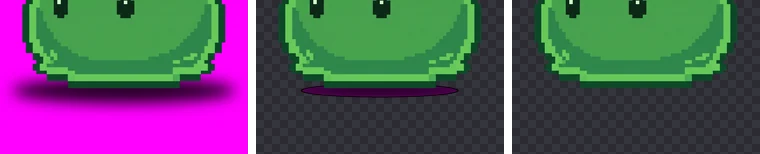
Fix: lowering “Glow minimum brightness” from 80 to 30 left 0% of the shadow for both characters. In exchange, the slime lost part of its bottom outline, 0.17% of the body; the plant lost nothing. The darker a drawing's outline, the more lowering this value breaks it, so stop as soon as the shadow disappears. This setting applies only to “Vivid solid” backgrounds.
Switching the background type to “Dull / pale solid”, on the other hand, made things worse. That mode looks only at the difference from the background color, so it judged the shadow to be “not background” (object) and left 55–86% of it.
Test: gray shadows
AI-drawn shadows aren't always darkened background color; sometimes they're painted in a gray or black unrelated to the background. So we also tested shadows blended toward gray. More gray means less saturation: in the two grayest cases, the least saturated shadow pixels measured 0.25 and 0.15, below the 0.3 default.
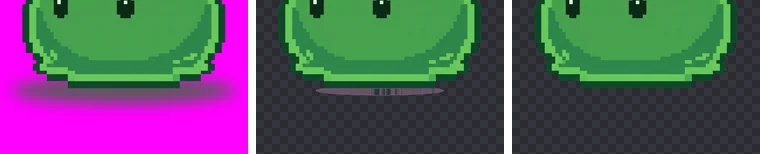
With defaults, lightly gray shadows were removed completely, but in the two grayest cases 6.3% and 11.8% of the shadow area remained. Fix: lowering “Glow minimum saturation” from 0.3 to 0.05 left 0% in both cases with no object loss. Lowering it can also remove grayish parts of the object that touch the background, like steel armor or stone, so check the result.
There's a limit. Pure gray or black with zero saturation has no hue, so there's no way to tell whether it belongs to the background's color family; no setting can remove it as glow. If the center of a shadow is perfectly neutral, regenerate the image or erase it in an editor.
Limits of this test
The test shadows were smooth ovals of evenly spreading color. Real AI shadows carry blotches and texture, and often come with a drawn floor underneath: tiles, grass, soil. A shadow is darkened background color, so the settings above can remove it, but grass and tiles are entirely different colors and, to BGPeel, part of the object. No setting removes a drawn floor; leave the floor out in the prompt or crop it off in an editor. And when a shadow touches the object's dark outline directly, the further you lower the thresholds to remove the shadow, the greater the risk of removing the outline with it.
How to spot leftover shadows
- A black shadow is invisible on a black preview background, so switch to white or the checkerboard.
- The semi-transparent rim of a shadow is hard to see on white, so open the zoom view and alternate with a dark background.
- If you processed many images, increase the card size and scan just the feet.
Settings summary
| Leftover shadow | Setting | Test result |
|---|---|---|
| Oval with a very dark purple or black center | Glow minimum brightness 80 → 30 | Shadow left 18.8–24.0% → 0%; slime outline 0.17% lost |
| Grayish shadow | Glow minimum saturation 0.3 → 0.05 | Shadow left 6.3–11.8% → 0% |
| Pure gray or black, zero saturation | Not fixable with settings | Regenerate |
Keeping shadows out in the first place
Add “no shadow, no floor, no ground, no cast shadow” to the prompt, and “floating” to make the character hover, and ground shadows become rare. If you love an image that already has a shadow, a conversational tool like Nano Banana can take a request like “remove only the shadow and keep the background solid magenta”. More wording is in Solid background prompts.
If your game needs shadows, add them in the engine rather than painting them into sprites. A single semi-transparent black oval sprite under every character gives consistent shadow shape and strength regardless of the artwork, and makes effects like keeping the shadow on the ground during a jump easy.