 BGPeel
Solid Background Prompts for Nano Banana, GPT Image and Midjourney
Half of a good background removal happens when the image is generated. A flat, even background comes off cleanly right down to the edges; a shadow or gradient leaves traces no matter how much you tweak the settings. Here's how to get a solid background from each major AI image tool, and which prompts tend to backfire.
Why a solid background instead of a transparent one?
Most image generators produce opaque pictures. Writing “transparent background” in a prompt usually doesn't give you a real transparent PNG; instead, the model often paints the gray-and-white checkerboard that editors use to show transparency. A painted checkerboard has two colors and is much harder to remove than a single flat color.
That's why people who make game sprites and icons ask for a background color the object almost never uses (usually magenta) and then remove just that color. It's the same idea as a chroma key in video. It works with every AI tool, and it lets you process dozens of images with one consistent rule.
The color you ask for isn't the color you get
We measured the border color of three images made with Nano Banana, all requested with a #FF00FF magenta background. The actual median background colors were #FC01FB, #FA25FE and #D506D9. The first is nearly exact, the second has 37 levels of green mixed in, and the third is noticeably darker.

Even within one image the background is not perfectly flat. Amplifying each background pixel's deviation from the median by 12 reveals faint blotches in what looks like a solid color, and the spirit character has a wide glow painted into the background around its body. The per-channel standard deviation along the borders ranged from 1.5 to 7.3 levels.
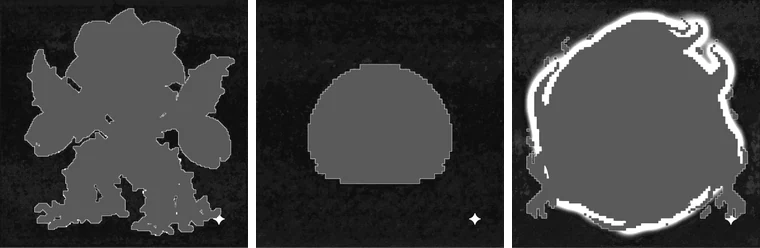
Differences like these are fine. BGPeel doesn't remove a fixed color; it measures the background from each image's border and treats nearby blotches and glows as background too. What matters is not whether the color value is exact, but whether anything else is in the background.
Rules that work in every tool
- Give both the color name and the hex code. Write “solid magenta (#FF00FF) background”. A name alone tends to drift toward pink or purple.
- Say “flat” more than once. Words like “flat”, “plain”, “uniform” and “single color” reduce gradients and lighting effects.
- Ask for no floor and no shadow. Put a character on its feet and the AI will want to draw a shadow under it. Add “no shadow, no floor, no ground”.
- Leave a margin. “centered, full body, with empty space around” keeps the object off the image edges. BGPeel measures the background along the border, and auto-detection needs at least a quarter of the border to be background.
- Pick a color the object doesn't use. Magenta is safest in most cases; the evidence is in our background color test.
Prompts that tend to fail
| Phrase | What often happens | Use instead |
|---|---|---|
| transparent background | A checkerboard is painted into the image | solid magenta (#FF00FF) background |
| green screen, chroma key | A whole studio: green backdrop, floor, lights | plain flat green (#00FF00) background |
| white background | Floor shadow; white highlights merge with the background | Only if the object has no white; otherwise magenta |
| studio lighting, dramatic lighting | Vignetting and gradients toward the edges | flat lighting, even lighting |
| glowing, aura | Light spills widely into the background | Describe the light effect as inside the object |
BGPeel removes glows connected to the background fairly well, but a glow whose color is far from the background color can remain. Leftover shadows and gradients are covered with test results in A shadow is left behind and Gradient backgrounds.
Nano Banana (Gemini)
Nano Banana follows hex codes fairly well and is strong at editing an image through conversation. If you like a character but the background is messy, don't regenerate from scratch; ask it to change only the background, for example “Keep the character exactly the same and change only the background to solid magenta (#FF00FF), no shadow”. When you need the same character in several poses, attaching the first image as a reference keeps the style steadier.
pixel art goblin warrior, game sprite, full body, centered,
solid flat magenta (#FF00FF) background, no shadow, no floor,
no gradient, empty space around the character
Images made with Nano Banana get a small sparkle mark in the bottom-right corner. If the mark sits on the background, BGPeel removes it along with the background. See Remove the Nano Banana watermark.
GPT Image (ChatGPT, OpenAI API)
OpenAI's GPT Image models offer a transparent background option in the API (set background to transparent and save as PNG or WebP). If you need one or two images and like the result, that may be all you need. The trade-off is that you can't control how the model handles the edges, and edge quality can vary from image to image within a set. If you want every edge handled by the same rule, or you're generating somewhere without the transparent option, use a solid background.
A cute slime monster in 16-bit pixel art style, game asset,
front view, centered with generous margins.
Background: one solid flat color, pure magenta #FF00FF,
no shadow, no ground, no texture, no lighting gradient.
GPT Image handles long descriptive sentences well, so putting the background requirements in a separate sentence makes them less likely to be ignored.
Midjourney
Midjourney applies a strong house style and tends to add lighting and texture even when you ask for a plain background. Use two tools together: the --no parameter to exclude unwanted elements, and --style raw to reduce embellishment. According to the official docs, --no accepts a comma-separated list but reads each word separately, so “--no dark shadow” excludes “dark” and “shadow” independently. Stick to single words.
pixel art fire spirit, game sprite, centered, full body,
flat solid magenta background, simple, isolated
--no shadow, gradient, texture, vignette, floor --style raw
Midjourney is not precise with hex codes, and magenta can come out as hot pink or purple. BGPeel's auto-detection measures whatever color appears, so that's fine, but if the background comes out as a dull pink it is processed in “Dull / pale solid” mode instead of “Vivid solid”. That mode can also remove object colors close to the background, so check the result.
What to check right after generating
- Does the object touch the edges? If it covers much of the border, the background color can't be found and the image is skipped.
- Is there a shadow under it? A dark shadow can stay behind as a black blob.
- Are the corners darker, or does one side change color? Gradients can leave residue.
- Does the object use the background color? Colors close to the background can be eaten.
If all four look fine, drop the whole folder onto BGPeel and remove every background in one go.